Cable Tester Buying Guide: The Specs That Matter (and the Ones That Do Not)
Listings compete on feature-count; networks are fixed by three capabilities. This page ranks what a tester can actually do by how often each capability settles a real problem - so the money goes to the spec you will use, not the one that photographs well.
The spec ladder, ranked by real-world payoff
| Capability | Settles | Who needs it |
|---|---|---|
| Wiremap with fault names | "Is this cable dead?" | Everyone - the floor |
| Split-pair detection | "Links at 100 Mbps forever" | Anyone who terminates cable |
| Length measurement | "Where does it break? Is the run over 100 m?" | Installers, long runs |
| POE detection | "Is the port powering the camera?" | Camera/AP/VoIP work |
| Link & service report | "Prove it works, in writing" | IT departments, contracts |
Every row above the one you need is wasted budget - and every row below is a future callback. The Klein VDV526-100 is the floor done right; the NF-8209 is the ladder's first three rungs in one body; the LinkSprinter is the whole ladder with a report printer attached.
Specs that photograph better than they work
Pin-count of LEDs. Eight LEDs in a row look technical and do exactly what a $10 tester does. "Supports Cat8" on a wiremap tester means the RJ45 socket physically fits the plug - it says nothing about frequency-band testing. NCV (non-contact voltage) is a nice electrician's feature that has never once found a network fault. Tone tracer/probe combos are genuinely useful for tracing cables through walls - but buy it for tracing, not testing.
The one quietly valuable extra is port flashing: making a switch port's LED blink to identify which room a cable lands in. It sounds trivial until you are standing in a closet of forty identical ports.
Budgeting by scenario
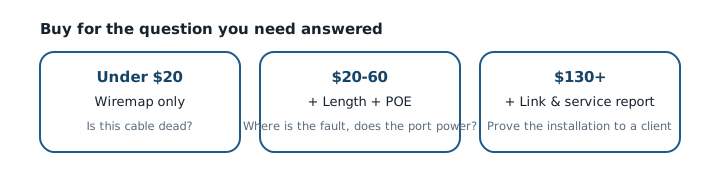
$0 question, $15 answer: if your problem is "some cables in the drawer are bad", the budget tier sorts the drawer in an afternoon. $50 question: if you crimp, run, or repair cable, split-pair and length pay for themselves the first time you avoid re-pulling a 30-meter run. $150+ question: if someone pays for your work or your network outages cost real money, the professional tier buys answers with signatures attached. Match the tier to the question - the scenario guide walks each one - and buy the boring, well-known model at that tier: fault-finding is not the place for a no-name bargain.
Frequently asked questions
What is the single most important spec?
Split-pair detection. It is the difference between catching the most common real-world wiring fault and certifying a bad cable as good. If a listing cannot say "split" in the feature list, assume it cannot find one.
Is a $100+ tester worth it for a home?
Almost never. Homes live in the wiremap tier with maybe a prosumer unit if you terminate your own cable. The expensive tiers buy documentation and link-level proof that home networks do not need.
What does "certification" mean versus "qualification"?
Certification (the $500+ class, e.g. Fluke DSX series) tests a run against a formal category standard and prints a pass certificate. Qualification testers (LinkSprinter class) prove the link works to the negotiated speed. Neither is necessary to fix a home network - know which one a listing is actually selling.
Do I need separate testers for Cat5e/Cat6/Cat6A?
No - RJ45 is RJ45 at these categories. The cable category describes manufacturing tolerance; any RJ45 tester verifies the wiring of all of them. Certification to a category standard is the separate, expensive tier above.
How accurate is tester length measurement?
Good enough to find which ceiling tile, not good enough to bill by. Expect a few percent of error from cable nominal-velocity variations; calibrate against a known length for the best results.