Ethernet Not Working? The Fault-Finding Ladder
Network problems hide in one of four places: the cable, the termination, the port, or the device. Work the ladder top to bottom - each rung either finds the fault or eliminates a suspect, and the whole climb takes ten minutes with any tester from our main picks.
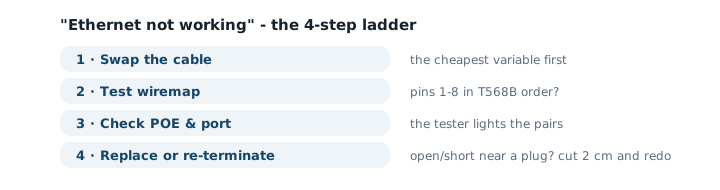
Rung 1 - swap the cable (solves half of all cases)
Patch cables lead hard lives: chair wheels, door frames, desk moves. Before anything else, replace the suspect cable with one that works. If the link comes up, you are done - keep the dead cable for practice re-termination. If it does not, you have permanently eliminated the most likely suspect for the price of a minute.
Rung 2 - test the wiremap
Both ends disconnected, tester on: read the sequence. In-wall runs fail at the terminations far more often than in the middle - a keystone punched one position off, a plug where the jacket was too wide to seat fully. Re-punch or re-crimp both ends before assuming the run itself is damaged.
Rung 3 - check power and the port
For cameras, access points and phones, test POE: a prosumer tester shows whether the port delivers power and on which pairs. A camera that will not boot on a "good" cable is usually a POE budget or configuration issue, not a hardware death. Then move the device to a different switch port - ports die quietly and ports get misconfigured, and the test takes less time than the argument about it.
Rung 4 - re-terminate, or stop
An open or short that survives two clean re-terminations lives inside the run - through a staple, a tight bend, or water in an exterior box. At that point the honest math is: pulling a new run beats tracing a break inside a wall. Replace the section or the run; do not pay hours to chase dollars.
The two symptoms with their own rules
"Stuck at 100 Mbps": that is a split pair talking - gigabit negotiates and instantly fails, so the link lands at fast ethernet forever. Cheap testers bless the cable; only split-pair detection sees the truth. "Works, then drops at random": marginal contact or interference - re-terminate first, then reroute the run away from power lines and motors. Both symptoms share a moral: the fault that passes a cheap test is the fault worth buying a better tester for.
When the ladder ends and every rung passes, the problem was never the cable - hand off to your router's logs or your ISP with the tester's report in hand, which is exactly the evidence that shortens support calls.
Frequently asked questions
The tester says the cable is fine but there is still no link - now what?
Move upstream: try the same device and port with a known-good cable, then the device on another port. If the tester is wiremap-only, the fault may be a split pair or a length/interference issue it cannot see - the prosumer tier exists exactly for this dead end.
Why does my connection drop at random times?
Intermittent drops are the classic signature of a marginal termination or interference: a plug that loses contact on vibration, or an untwisted section running beside power. Re-terminate both ends first; if it persists, test for split pairs and check the run’s path past power lines and motors.
Can a bad cable really limit speed to 100 Mbps?
Yes - a split pair or marginal pair often negotiates gigabit and immediately fails, so devices fall back to 100 Mbps and stay there. If a link is stuck at 100 on gigabit gear, test for split pairs before replacing the switch.
Do I test the cable with the router powered on?
The cable test itself: everything disconnected (basic testers must never meet live POE). Everything around the test - port LEDs, device behavior - observe with the network powered as normal.
When do I stop fixing and replace?
Patch cables: replace immediately, they cost less than the diagnosis time. In-wall runs: two re-terminations fix most faults; if the tester still shows an open mid-run, pulling new cable (or bridging with a certified run) beats chasing a break inside a wall.